Sierra Chart study
Imbalance Zones
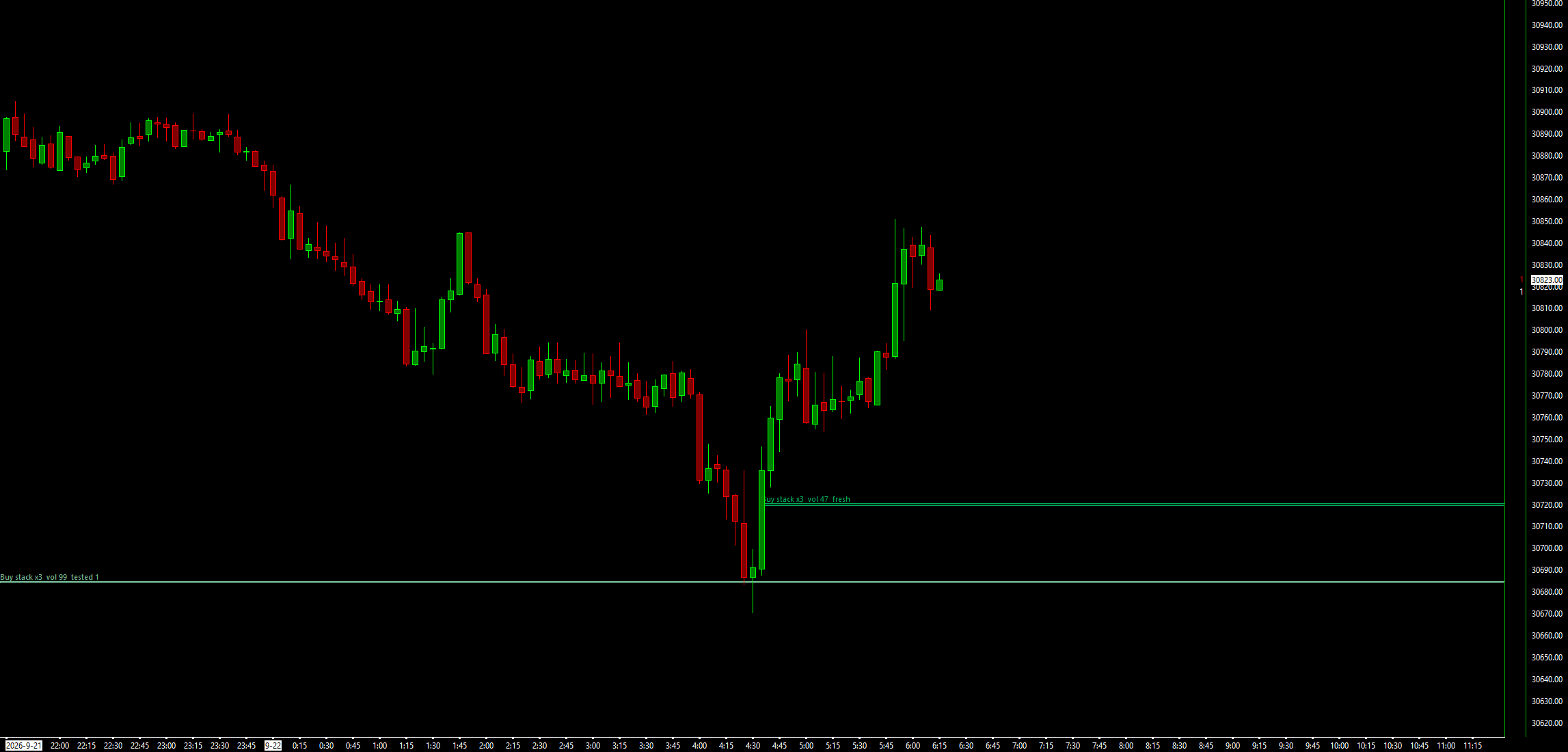
Stacked diagonal bid/ask imbalances from footprint data, drawn as zones that extend until price returns.
Imbalance Zones reads the bid and ask volume at every price of every closed bar, finds diagonal buy and sell imbalances, and draws a zone wherever three or more stack up. Zones extend right until price trades back through them, in fresh and tested colours. It is a way to see order flow on the chart, not a trading signal, and it places, changes and cancels no orders. A scorecard lets you check on your own chart whether the zones beat random levels.
What the study does
- Diagonal imbalances on each closed bar: ask volume at a price against bid volume one tick below (the reverse for sells), at your Imbalance Ratio (default 300%).
- A Minimum Volume on the imbalanced side (default 10), and a choice of what a zero-volume diagonal price means.
- Stacks of 3 or more consecutive imbalanced prices (an input) become zones, drawn as footprint cells.
- A zone ends when price touches it, closes through it (default) or fills it.
- Fresh and tested colours, the nearest 5 active zones per side, and optional ended zones in grey.
- No repainting: a bar is read once after it closes, and the forming bar is never used.
- Subgraphs for the nearest buy and sell zones, stacks formed, imbalance counts and zone touches, plus alert sounds when a stack forms or a zone is touched.
- A scorecard: each zone's first touch is traded on paper against random levels of the same side and height, shown as average R and a z score of the difference.
What you need
- Tick data with bid and ask volume. In Global Settings >> Data/Trade Service Settings set Intraday Data Storage Time Unit to 1 Tick, then use Edit >> Delete All Data and Download for the symbol.
- Data stored as 1-second or 1-minute records has no usable per-price bid/ask split. The study finds no imbalances on such a chart.
- Any bar type: time, volume or range.
- With a Volume at Price Multiplier above 1, prices are grouped and one tick in the rules becomes one VAP price step.
Set it up in Sierra Chart
Step 1: Buy and download
Checkout is a one-time payment. As soon as it is confirmed, the page Stripe returns you to has a Download button, and the receipt email carries the same link. Extract the .zip to any folder. It holds WaypointImbalanceZones_64.dll, plus a short INSTALL.txt.
Step 2: Unblock the DLL
Right-click WaypointImbalanceZones_64.dll > Properties. If the General tab shows an "Unblock" box, tick it, then click OK. Windows' Smart App Control can still refuse an unsigned DLL. If it does, the study is missing from the Add Custom Study list, or Sierra Chart's Message Log shows a loading error with the code 4551. Turning Smart App Control off is your own decision.
Step 3: Copy it into Sierra Chart's Data folder
Copy WaypointImbalanceZones_64.dll into Sierra Chart's Data folder. On a default install that is C:\SierraChart\Data. Otherwise it is the Data folder inside wherever Sierra Chart is installed.
Step 4: Add the study to a chart
Open the chart, then Analysis >> Studies >> Add Custom Study. Find the group "Waypoint Imbalance Zones", select "Waypoint Imbalance Zones", click Add, then OK. If the group is not in the list, restart Sierra Chart and look again.
Step 5: Load tick data with bid/ask volume
In Global Settings >> Data/Trade Service Settings, set Intraday Data Storage Time Unit to 1 Tick. Then use Edit >> Delete All Data and Download for the symbol, so the chart has bid and ask volume at each price.
Step 6: Tune the definition
Open the study's Settings. Set Imbalance Ratio (%), Minimum Volume on the Imbalanced Side and Stacked Prices for a Zone. Raise the minimum volume if the chart looks too busy.
Step 7: Check that it loaded
Open Window >> Message Log. Look for a line that starts with "Waypoint Imbalance Zones BUILD", followed by the build date and time. That line proves the study loaded. The line also shows how many bars have bid/ask volume. If that number is 0, a second message says the chart has no bid/ask volume.
Settings to check first
Open them with a right-click on the chart, then Studies, select the study and press Settings.
- Imbalance Ratio (%)
- How much larger the imbalanced side must be. A whole percent; a value exactly at the ratio counts. Default 300.
- Minimum Volume on the Imbalanced Side
- The imbalanced side must reach this volume. Default 10.
- When the Diagonal Price Has Zero Volume
- Counts as an imbalance (default), Never an imbalance, or Treat the zero as 1.
- Stacked Prices for a Zone
- Consecutive imbalanced prices needed for a zone. Default 3.
- Zone Ends When Price
- Touches it, Closes through it (default), or Fills it (trades its far edge).
- Zones Shown per Side (nearest to price)
- Active zones drawn each side. Default 5.
- Show Zone Scorecard (zones vs random levels on this chart)
- Shows the scorecard. Default Yes, with a 2R target, a 30-bar time exit, a stop 1 tick beyond the zone and a 1-tick cost.
Good to know
- A charting tool, not a trading signal. In the study's own scorecard on NQ and ES tick data, zones did no better than random levels of the same height after costs.
- Waypoint's earlier screens found that order-flow agreement signals showed no tradable advantage after costs.
- Zones are tight: a 3-price stack is about 2 ticks tall, so costs are a large share of the risk on any trade placed at one.
- The default zero rule counts a zero-volume diagonal as an imbalance, which flags a bar's extreme price whenever its volume reaches the minimum. Switch to Never if you want both sides to have traded.
- Without tick data that carries bid and ask volume it draws nothing.
- It draws only. It places, changes and cancels no orders.
How it was tested. The engine was fed footprints built from Sierra Chart tick files for NQ and ES and compared with an independent reference written a different way, zone by zone, bar by bar and trade by trade, in five configurations, plus hand-computed checks.
More studies
$19
One-time, instant download
Trade an idea around these levels?
Screen it first. Describe the rule in plain English and it is tested on tick data through pre-registered gates, after costs, with every trial counted in the public ledger.