Waypoint Smart Money · Sierra Chart study
Liquidity
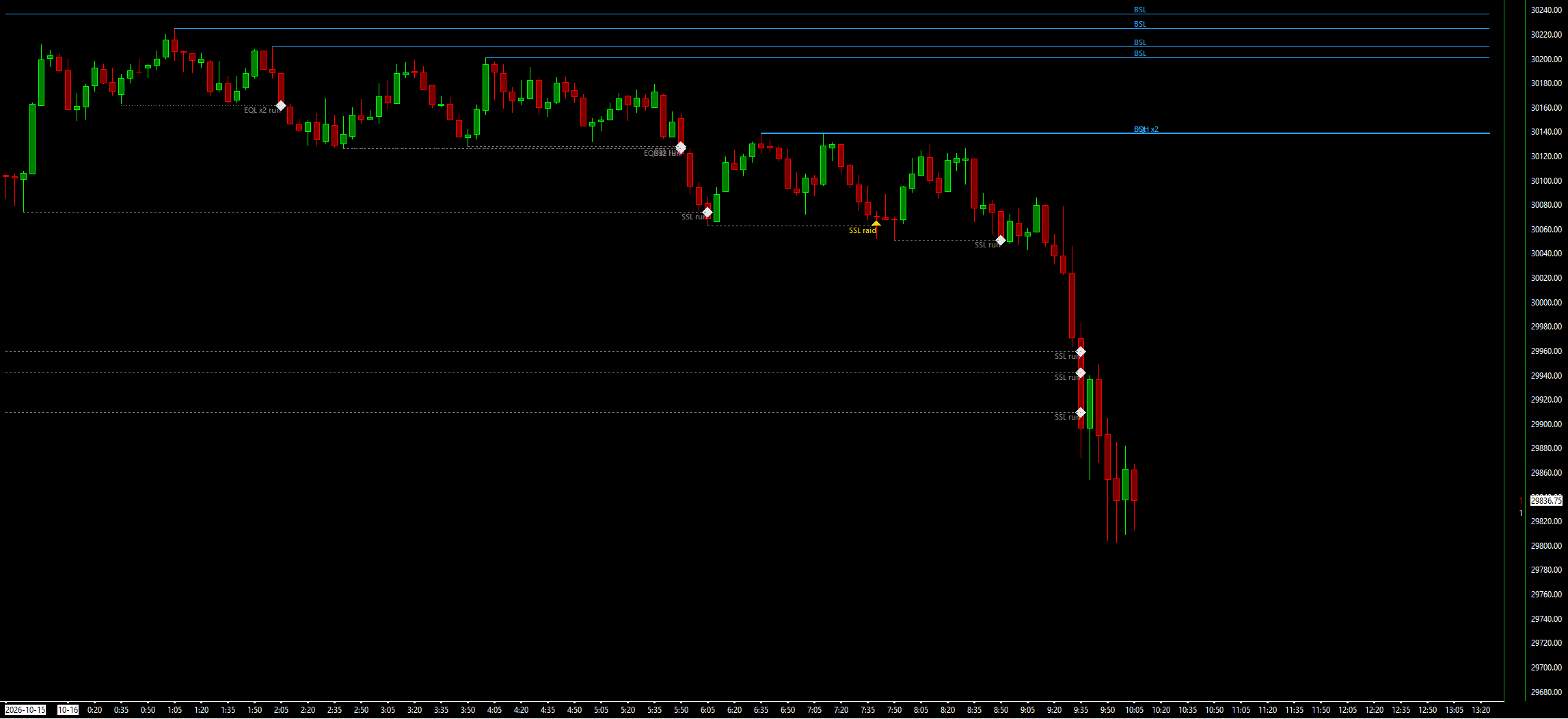
Buy-side and sell-side liquidity pools, with every sweep marked as a raid or a run.
Liquidity draws buy-side and sell-side liquidity pools on your chart: equal highs and lows, unswept swing highs and lows, and the prior day's and prior week's high and low. When price trades through a pool, its line ends and the sweep is marked as a raid (the bar closed back) or a run (it closed beyond). Pools appear only after the bar that confirms them has closed, so nothing repaints, and a raid scorecard lets you check on your own chart whether raids did better than random-time entries. It draws and alerts; it places, changes and cancels no orders.
What the study does
- Buy-side pools above highs and sell-side pools below lows, each type with its own switch: equal highs and lows (EQH, EQL), unswept swing highs and lows (BSL, SSL), the prior day's high and low (PDH, PDL) and the prior week's (PWH, PWL).
- Equal highs: two or more confirmed swing highs (Internal Length, default 3) within the tolerance and within 100 bars, with no high above the pool between them. The label shows how many swings are in the pool. Equal lows mirror this.
- Prior day and week from New York time: the Globex day starts at 18:00 New York and the week at Sunday 18:00. These pools last through the next day or week, then end as expired if not swept.
- Sweeps: a bar that trades beyond a pool ends its line. A raid (closed back at or inside the level) gets a triangle pointing the way price was rejected; a run (closed beyond) gets a diamond.
- Swept pools stay visible for 100 bars by default, labelled raid, run or expired. The nearest 8 active pools per side are drawn, extended right.
- Pivot Pool Timeframe in Minutes builds the equal and swing pools from a higher timeframe on the same chart, for example 15 or 60 on a 1-minute chart. Sweeps are always judged on the chart's own bars.
- A panel with the active pools per side and the nearest one, the last sweep, and the raid scorecard.
- Alerts on raids (and, by input, runs), at most one per side per closed bar, naming every pool the bar swept. Hidden subgraphs give the nearest pools, the sweep flags and the pool counts, for spreadsheets and other studies.
- A raid scorecard: each raid is traded on paper (reverse at the raid bar's close, stop 1 tick beyond its extreme, 2R target, time exit) against 3 random-time entries with the same direction and stop distance.
What you need
- Any intraday chart. A 24-hour (Globex) chart for the prior day and prior week pools.
- The chart's time zone set correctly in Sierra Chart. The study reads it to find 18:00 New York.
- For the most exact scorecard, a 1-minute chart, with Pivot Pool Timeframe in Minutes set for higher-timeframe pools.
- A back-adjusted continuous contract for long history, so a roll is not read as a sweep.
Set it up in Sierra Chart
Step 1: Buy and download
Buy this study on its own here, or all eight Waypoint Smart Money studies at once from the Smart Money page (one .zip with every DLL). Checkout is a one-time payment. As soon as it is confirmed, the page Stripe returns you to has a Download button, and the receipt email carries the same link. Extract the .zip to any folder. It holds WaypointLiquidity_64.dll, plus a short INSTALL.txt.
Step 2: Unblock the DLL
Right-click WaypointLiquidity_64.dll > Properties. If the General tab shows an "Unblock" box, tick it, then click OK. Windows' Smart App Control can still refuse an unsigned DLL. If it does, the study is missing from the Add Custom Study list, or Sierra Chart's Message Log shows a loading error with the code 4551. Turning Smart App Control off is your own decision.
Step 3: Copy it into Sierra Chart's Data folder
Copy WaypointLiquidity_64.dll into Sierra Chart's Data folder. On a default install that is C:\SierraChart\Data. Otherwise it is the Data folder inside wherever Sierra Chart is installed.
Step 4: Add the study to a chart
Open the chart, then Analysis >> Studies >> Add Custom Study. Find the group "Waypoint Liquidity", select "Waypoint Liquidity", click Add, then OK. If the group is not in the list, restart Sierra Chart and look again.
Step 5: Check the New York clock
Prior day and week pools start at 18:00 New York (the week on Sunday), so put the study on a 24-hour chart. New York Time From (default: Built-in New York DST rules) reads your chart's time zone from Sierra Chart and converts it. If the zone cannot be read, the study uses Sierra's own conversion and says so in the Message Log. You can also choose a fixed offset and set Chart Time Zone Offset From New York.
Step 6: Choose the pools
Open the study's Settings. Switch each pool type on or off: Equal Highs/Lows Pools, Unswept Swing High/Low Pools, Prior Day High/Low Pools and Prior Week High/Low Pools. Leave Pivot Pool Timeframe in Minutes at 0 for pools from the chart's own bars, or set 15 or 60 on a 1-minute chart for higher-timeframe pools.
Step 7: Read the panel
The panel sits in the top-left corner by default (Panel Position moves it). It lists the active buy-side and sell-side pools with the nearest of each, and the last sweep. The raid scorecard below shows trades, average R and win rate for raids and for random-time entries. Once there are 30 raid trades it says whether raids beat random-time entries, did worse, or showed no evidence of a difference.
Step 8: Check that it loaded
Open Window >> Message Log. Look for a line that starts with "Waypoint Liquidity BUILD", followed by the build date and time. That line proves the study loaded. It ends with "New York = chart time" and the offset in hours on the last bar: +0.00 on a New York chart, +1.00 on a Chicago chart. A second line, "Waypoint Liquidity time check", says whether Sierra's time-zone conversion and the study's own New York rules agree. If it is logged as an error, switch New York Time From to the conversion that is right for your chart.
Settings to check first
Open them with a right-click on the chart, then Studies, select the study and press Settings.
- Pivot Pool Timeframe in Minutes (0 = chart bars, 1440 = Globex day)
- Builds the equal and swing pools from a higher timeframe on the same chart. Default 0 (chart bars).
- Swing Length (unswept swing high/low pools)
- Bars each side for a swing high or low that becomes a pool. Default 10.
- Internal Length (equal highs/lows pivots)
- Bars each side for the swings that make equal highs and lows. Default 3.
- Equal Tolerance (ticks)
- How close two swings must be to count as equal. Default 2. Equal Tolerance (x ATR; the larger of the two is used) defaults to 0.1, and Equal Max Gap Between Pivots to 100 bars.
- Prior Day High/Low Pools (Globex day from 18:00 New York)
- The prior Globex day's high and low as pools. Default Yes. Prior Week High/Low Pools is also Yes.
- New York Time From
- Built-in New York DST rules (chart time zone from Sierra) by default; or Sierra's time-zone conversion, or a fixed offset (Chart Time Zone Offset From New York, default 0).
- Keep Swept Pools Visible (bars after the sweep, 0 = remove)
- How long a swept pool stays on the chart. Default 100, with Max Swept Pools Drawn at 20.
- Show Raid Scorecard (raids vs random-time entries on this chart)
- Shows the raid scorecard in the panel. Default Yes, with a 2R target, a 60-bar time exit, a 1-tick cost and 3 random-time entries per raid within 300 bars.
Good to know
- A charting and context tool, not a signal service. A raid or run marker is not a trade signal, and the study makes no claim that pools forecast price.
- Waypoint's own tests found that reversing after a raid was not a tradable edge after costs: on higher-timeframe pools it did no better than random-time entries, and on 1-minute charts the difference was far too small to pay the cost. The scorecard lets you check this on your own chart.
- The scorecard grades one fixed rule on chart bars. A bar that spans the stop and target is decided by which is nearer its open, so a 1-minute chart grades most exactly. It is a paper check of this chart's history, not a backtest of your strategy and not a forecast.
- Prior day and week pools need a 24-hour chart and the right time zone. The chart's first day and first week are usually partial, so they make no pools.
- A bar that raids both sides at once sets the combined sweep flag to 0 and is not scored.
- On an unadjusted continuous contract, the jump at each roll is treated as real price and can sweep pools. Use a back-adjusted contract.
- It places, changes and cancels no orders.
How it was tested. The engine was compiled exactly as shipped and compared pool by pool, bar by bar and trade by trade with an independent reference, on years of NQ, ES and CL 1-, 15- and 60-minute data, including pivot pools built on higher timeframes from 1-minute bars. Its swing pivots were checked against Waypoint Market Structure's reference, and the forming-bar copy was checked on every chart bar.
More Waypoint Smart Money studies
$9.99
Market Structure
Swing and internal structure: HH/HL/LH/LL points, BOS, CHoCH and MSS lines, and strong/weak highs and lows.
$9.99
Fair Value Gaps
Fair value gaps with fill tracking, CE lines, inversions and BPRs, plus a scorecard against random levels.
$9.99
Order Blocks
Order blocks and breaker blocks from structure breaks, on any timeframe, scored against random levels.
$9.99
One-time, instant download
Trade an idea around these levels?
Screen it first. Describe the rule in plain English and it is tested on tick data through pre-registered gates, after costs, with every trial counted in the public ledger.