Free Sierra Chart study
Market Internals
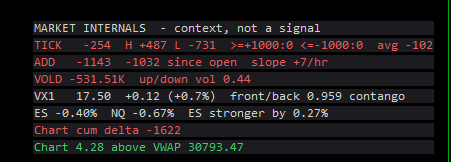
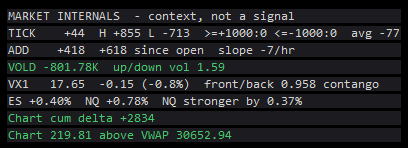
NYSE TICK, ADD, VOLD, the VIX, ES vs NQ and this chart's delta in one panel. Context, not a signal.
Market Internals reads NYSE TICK, ADD and VOLD, the VIX and its term structure, and ES against NQ, and shows them in one panel on your futures chart, beside this chart's own cumulative delta and VWAP. The panel is context only, not a signal: each reading is coloured on its own and the study builds no combined score. Waypoint screened internals agreement and it showed no tradable edge after costs. It draws a panel and fills subgraphs; it places, changes and cancels no orders.
What the study does
- TICK: the current reading, the RTH high and low, how many TICK bars reached +1000 or -1000, and the session average.
- ADD: the value, the change since the RTH open, and its slope per hour since the open.
- VOLD: the value, plus the up/down volume ratio if its symbol is set.
- VIX: the level, the change against the last RTH close, and a front/back term-structure ratio (above 1 = backwardation).
- ES vs NQ: each one's percent move since the RTH open, and which is stronger.
- This chart: RTH cumulative delta (ask minus bid volume) and the close against RTH VWAP.
- A greyed row says why: [as of MM-DD], [stale], no data, or off.
- Every band, colour and threshold is an input, and every value is also a hidden subgraph for spreadsheets and alerts.
- No lookahead: another symbol's bar is used only once it has ended, and closed bars are never repainted.
What you need
- Data for the other symbols from your feed: NYSE market statistics (TICK, net advancing issues, up minus down volume, up/down volume ratio), the VIX index (CBOE index data), VX futures, and ES and NQ.
- The defaults are Sierra Chart data feed names: TICK-NYSE, NISS-NYSE, NVOL-NYSE, UDVR-NYSE, VIX_CGI, VXV26-CFE and VXX26-CFE, ESZ26.CME and NQZ26.CME. Other feeds name these differently.
- Bid and ask volume in this chart's data, for the cumulative delta row.
- A futures chart with its session times set. The study opens hidden charts for the other symbols with this chart's session times and time zone.
Set it up in Sierra Chart
Step 1: Download and extract
Download the .zip from this page and extract it to any folder. It holds WaypointMarketInternals_64.dll, plus a short INSTALL.txt.
Step 2: Unblock the DLL
Right-click WaypointMarketInternals_64.dll > Properties. If the General tab shows an "Unblock" box, tick it, then click OK. Windows' Smart App Control can still refuse an unsigned DLL. If it does, the study is missing from the Add Custom Study list, or Sierra Chart's Message Log shows a loading error with the code 4551. Turning Smart App Control off is your own decision.
Step 3: Copy it into Sierra Chart's Data folder
Copy WaypointMarketInternals_64.dll into Sierra Chart's Data folder. On a default install that is C:\SierraChart\Data. Otherwise it is the Data folder inside wherever Sierra Chart is installed.
Step 4: Add the study to a chart
Open the chart, then Analysis >> Studies >> Add Custom Study. Find the group "Waypoint Market Internals", select "Waypoint Market Internals", click Add, then OK. If the group is not in the list, restart Sierra Chart and look again.
Step 5: Set the cash session
Open the study's Settings. RTH Start Time and RTH End Time are in the chart's time zone. The defaults are New York 09:30-16:00; on a Chicago-time chart use 08:30 and 15:00.
Step 6: Set the symbols for your data feed
Each panel item has a Symbol input; leave one empty to switch that row off. On the Sierra Chart data feed the defaults are TICK-NYSE ($TICK), NISS-NYSE ($ADD, net advancing issues), NVOL-NYSE ($VOLD), UDVR-NYSE (up/down volume ratio) and VIX_CGI (VIX). For another universe swap the suffix, for example TICK-SP, NISS-NASDAQ or NVOL-NYSE_NASDAQ_NYSEMKT. On another feed (IQFeed, CQG, Interactive Brokers and so on), search its symbol list for TICK, advances minus declines and up minus down volume, and type those names in.
Step 7: Roll the contract-month symbols
The ES, NQ and two term-structure inputs name specific contract months (ESZ26.CME, NQZ26.CME, VXV26-CFE and VXX26-CFE by default). Set them to the current months, and update the VX pair at each monthly expiry. For the classic VIX / VIX3M ratio, set the front to the VIX and the back to VIX3M on your feed. Sierra Chart's symbol search shows your feed's spelling.
Step 8: Optional: read from your own chart
Each symbol also has a Read From Chart Number input. Point it at a chart you set up yourself, of any bar type. 0 opens the symbol by name in a hidden chart.
Step 9: Check that it loaded
Open Window >> Message Log. Look for a line that starts with "Waypoint Market Internals BUILD", followed by the build date and time. That line proves the study loaded. Below it there is one line per symbol: the chart it reads, its bar count and its last bar. A symbol with an old last bar is not updating on your feed.
Settings to check first
Open them with a right-click on the chart, then Studies, select the study and press Settings.
- NYSE $TICK Symbol (empty = off)
- The TICK symbol on your feed. Default TICK-NYSE.
- NYSE $ADD (net advancing issues) Symbol (empty = off)
- Advancing minus declining issues. Default NISS-NYSE.
- NYSE $VOLD (up minus down volume) Symbol (empty = off)
- Up minus down volume. Default NVOL-NYSE.
- VIX Symbol (empty = off)
- The VIX index. Default VIX_CGI, which needs CBOE index data.
- ES Symbol (empty = off)
- The ES contract for the ES vs NQ row. Default ESZ26.CME; NQ Symbol defaults to NQZ26.CME. Roll both by hand.
- RTH Start Time (chart time zone)
- Start of the cash session. Default 09:30; RTH End Time defaults to 16:00.
- Bar Seconds for Charts the Study Opens
- Bar size of the hidden charts. Default 60. The TICK bar counts depend on it.
- TICK Upper Threshold
- Level that counts a TICK bar as extreme. Default 1000; TICK Lower Threshold defaults to -1000.
Good to know
- Context only, not a signal. Waypoint screened internals agreement (cumulative delta, side of VWAP and NYSE $ADD all agreeing) on NQ and ES, and it showed no tradable edge after costs. The colours describe each reading; they do not say what to do.
- It shows only what your feed delivers. Without the market-statistics or CBOE index data those rows stay greyed.
- Symbol names differ by data feed. Waypoint checked only the Sierra Chart data feed names.
- Contract-month symbols do not roll themselves. Update them at each expiry.
- Each symbol opened by name uses a hidden chart. Changing a symbol opens another one, and removing the study may leave those charts open.
- The TICK counts count bars of the TICK series (1-minute by default), not ticks.
- It draws only. It places, changes and cancels no orders.
How it was tested. The engine was compiled exactly as shipped, run against hand-computed checks, and replayed against recorded TICK, ADD, VOLD, VX, ES and NQ data. Every output was compared on every chart bar with an independent reference, including a lookahead trap with 5-minute feeds on a 1-minute chart.
More free studies
Trade an idea around these levels?
Screen it first. Describe the rule in plain English and it is tested on tick data through pre-registered gates, after costs, with every trial counted in the public ledger.