Free Sierra Chart study
Session Levels + Anchored VWAP
Opening range, initial balance, prior day and overnight levels, plus right-click anchored VWAPs.
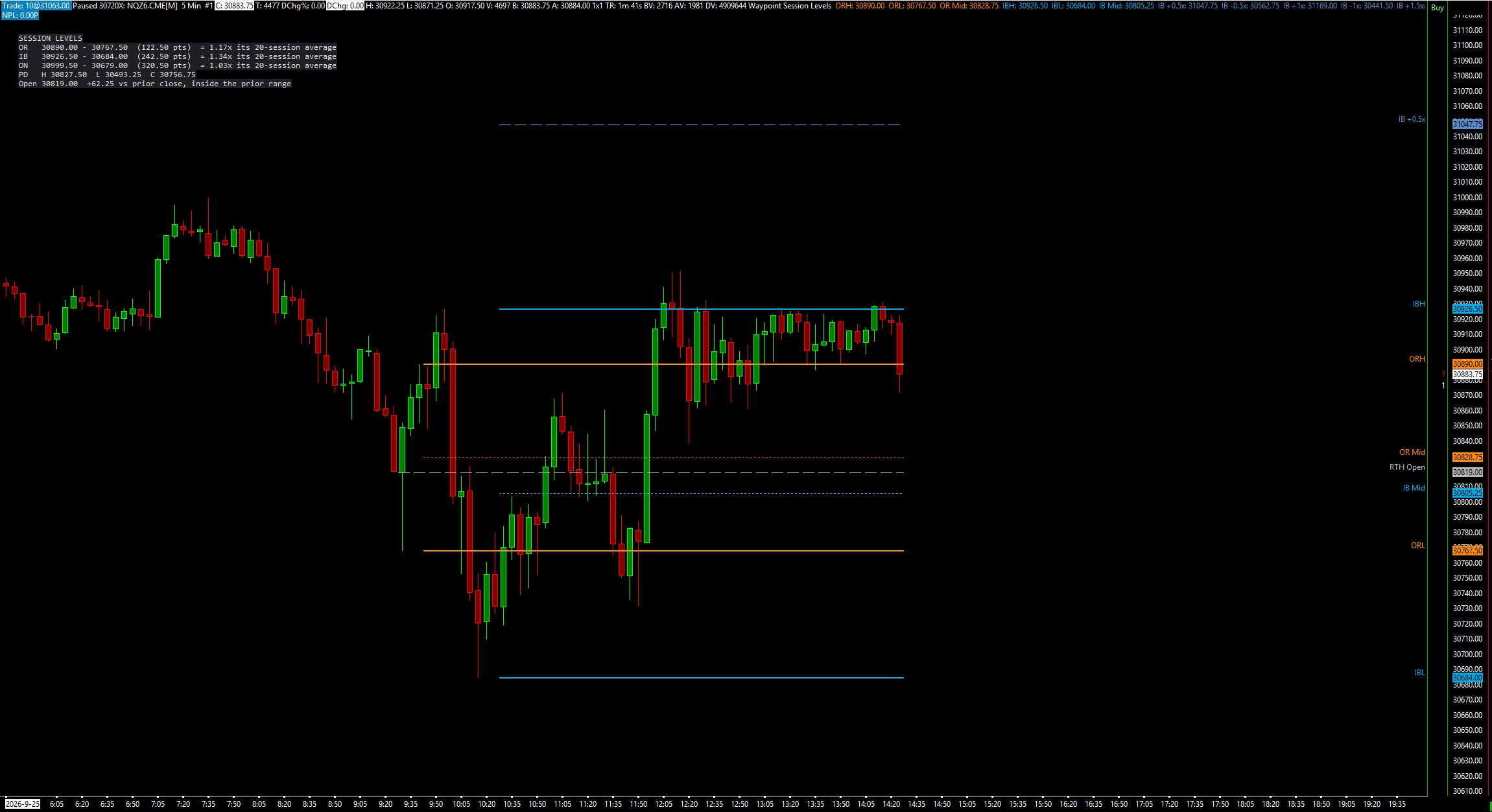
Two studies in one free DLL. Waypoint Session Levels draws the opening range, the initial balance and its extensions, the prior day's high, low and close, the overnight range and the RTH open, each on the bar where it becomes known. Waypoint Anchored VWAP starts a VWAP at any bar you right-click, with optional standard-deviation bands. Both only draw; they place, change and cancel no orders.
What the study does
- Opening range: high, low and mid of the first Opening Range Minutes of RTH (default 15), with two optional extensions each way.
- Initial balance: high, low and mid of the first Initial Balance Minutes (default 60), with extensions at 0.5, 1, 1.5 and 2 times the IB range. Each one can be changed or switched off.
- Prior day high, low and close of the previous RTH session. The high and low can cover the full Globex day instead.
- Overnight high, low and mid from Overnight Start Time (default 18:00) to the RTH open, plus an RTH open line.
- A session panel: OR, IB and overnight ranges as multiples of their own 20-session average, the prior high, low and close, and where the open sits against the prior close and range.
- No repainting. Each level appears on the bar where it becomes known. The OR and IB can be drawn growing while their window is open, or hidden until it closes.
- An optional alert sound when a closed bar touches a level the bar before it did not.
- Every level is a subgraph, so alerts, spreadsheets and other studies can read it.
- Anchored VWAP: right-click the chart and choose Anchor VWAP Here. Up to 8 anchors, optional 1x and 2x standard-deviation bands, and anchors saved with the chartbook.
What you need
- Any intraday chart. The defaults are set for US index futures (ES, NQ) on New York time.
- A 24-hour chart for the overnight levels. An RTH-only chart shows no overnight levels.
- For an exact opening range and initial balance, a bar size that divides the window, such as 1-, 3-, 5- or 15-minute bars.
- Bar volume on the chart, for the anchored VWAP.
Set it up in Sierra Chart
Step 1: Download and extract
Download the .zip from this page and extract it to any folder. It holds WaypointSessionLevels_64.dll, plus a short INSTALL.txt.
Step 2: Unblock the DLL
Right-click WaypointSessionLevels_64.dll > Properties. If the General tab shows an "Unblock" box, tick it, then click OK. Windows' Smart App Control can still refuse an unsigned DLL. If it does, the study is missing from the Add Custom Study list, or Sierra Chart's Message Log shows a loading error with the code 4551. Turning Smart App Control off is your own decision.
Step 3: Copy it into Sierra Chart's Data folder
Copy WaypointSessionLevels_64.dll into Sierra Chart's Data folder. On a default install that is C:\SierraChart\Data. Otherwise it is the Data folder inside wherever Sierra Chart is installed.
Step 4: Add the study to a chart
Open the chart, then Analysis >> Studies >> Add Custom Study. Find the group "Waypoint Session Levels", select "Waypoint Session Levels" or "Waypoint Anchored VWAP" (add each one you want the same way), click Add, then OK. If the group is not in the list, restart Sierra Chart and look again.
Step 5: Set the session times
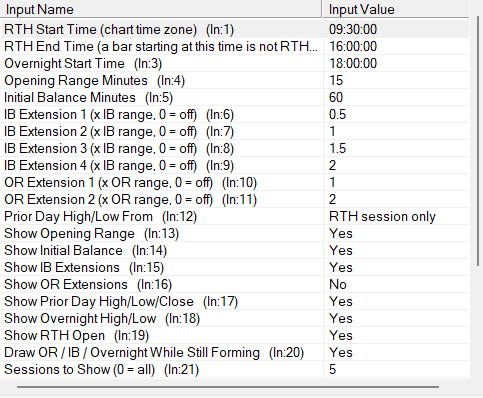
Open the study's Settings. RTH Start Time, RTH End Time and Overnight Start Time are in the chart's time zone. The defaults (09:30, 16:00 and 18:00) are New York time for US index futures. On a Chicago-time chart use 08:30, 15:00 and 17:00. A bar that starts at the RTH End Time is not counted as RTH.
Step 6: Anchor a VWAP
With Waypoint Anchored VWAP on the chart, right-click the chart and choose Anchor VWAP Here. A VWAP starts at the bar under the pointer. Remove Nearest Anchored VWAP and Remove All Anchored VWAPs are on the same menu.
Step 7: Check that it loaded
Open Window >> Message Log. Look for lines that start with "Waypoint Session Levels BUILD" and "Waypoint Anchored VWAP BUILD", followed by the build date and time. That line proves the study loaded.
Settings to check first
Open them with a right-click on the chart, then Studies, select the study and press Settings.
- RTH Start Time (chart time zone)
- When the regular session opens, in the chart's time zone. Default 09:30 (New York).
- RTH End Time (a bar starting at this time is not RTH)
- When the regular session ends. Default 16:00.
- Overnight Start Time
- Where the overnight range starts. Default 18:00.
- Opening Range Minutes
- Length of the opening range from the RTH open. Default 15.
- Initial Balance Minutes
- Length of the initial balance from the RTH open. Default 60.
- Prior Day High/Low From
- RTH session only (default), or Overnight + RTH for the full Globex day.
- Sessions to Show (0 = all)
- How many sessions of levels are drawn. Default 5.
- Show Standard Deviation Bands
- Anchored VWAP only: draws bands at Band 1 and Band 2 (1x and 2x). Default No.
Good to know
- It draws reference levels only. It places, changes and cancels no orders, and the levels are not trade signals.
- Times follow the chart's time zone. If your chart is not on New York time, change the RTH and overnight times to match.
- An RTH-only chart shows no overnight levels. A Friday 16:00-17:00 stub is not counted in the overnight range.
- If the bar size does not divide the opening range or initial balance window, those ranges are not exact.
- The anchored VWAP is built from chart bars (price times bar volume), so it can differ by a tick from a VWAP built from the underlying trades.
- When all 8 anchors are in use, a new anchor moves the oldest one.
How it was tested. The level engine was compiled exactly as shipped and checked bar by bar against an independent reference on years of NQ and ES 1-minute data, on 24-hour and RTH-only charts. The forming-bar path was checked against the closed-bar result too.
More free studies
Trade an idea around these levels?
Screen it first. Describe the rule in plain English and it is tested on tick data through pre-registered gates, after costs, with every trial counted in the public ledger.