Waypoint Smart Money · Sierra Chart study
Opening Gaps
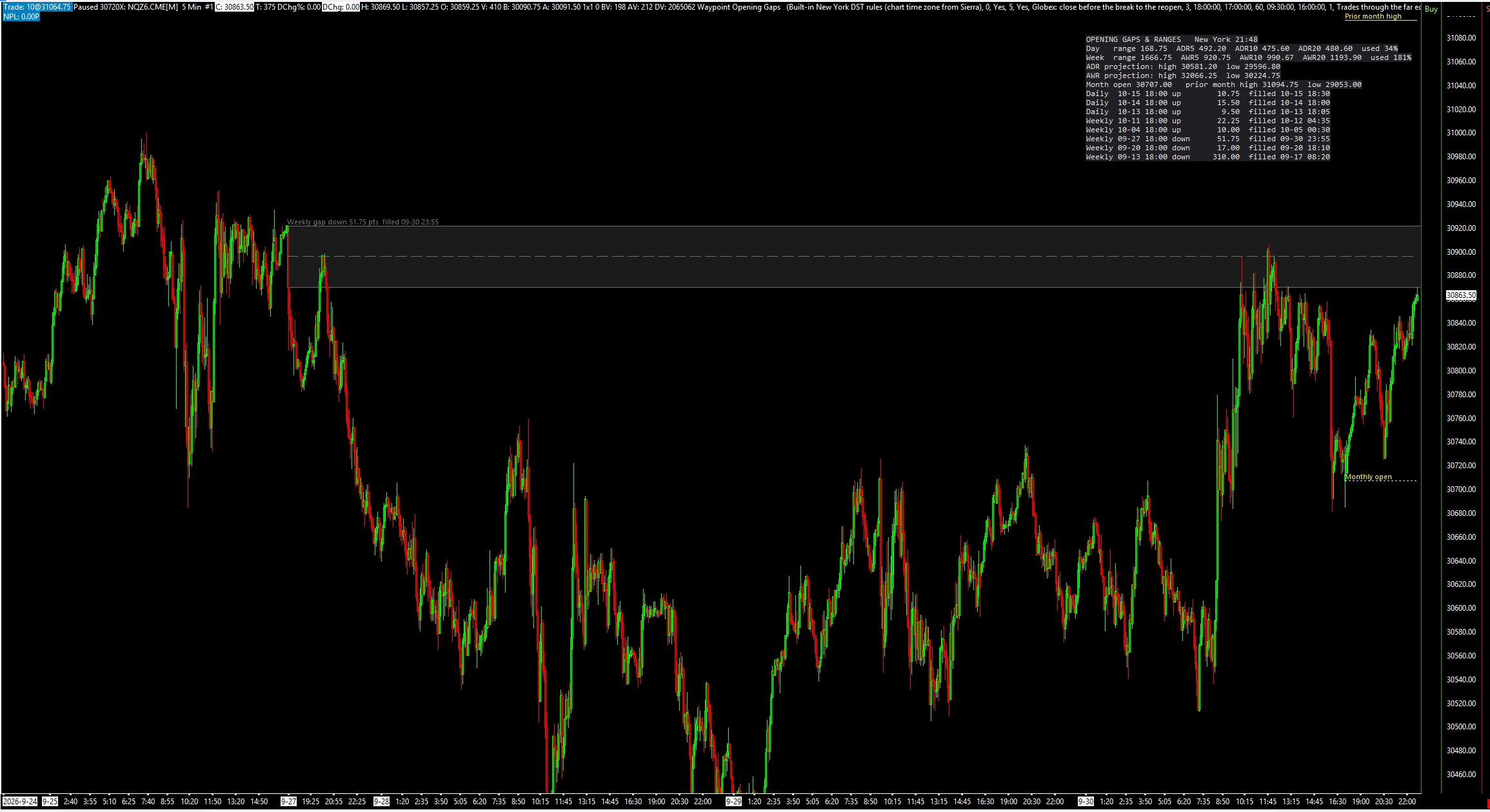
Weekly and daily opening gaps as boxes with their midpoint, plus ADR, AWR and the monthly levels.
Opening Gaps draws the weekly and daily opening gaps on a futures chart: Friday's close to the Sunday 18:00 reopen, and the close before the 17:00 break to the 18:00 reopen, or by input the RTH close to the next 09:30 open. These are the gaps some traders call the new week and new day opening gaps (NWOG / NDOG). Each gap is a box with its midpoint, extended until it is filled, beside average daily and weekly range levels and the monthly open. It works on closed bars, so nothing it has drawn changes later, and it places, changes and cancels no orders.
What the study does
- Weekly opening gaps: the last price of the Globex week (normally Friday 16:59) to the first price of the next week (normally Sunday 18:00), in New York time. After a holiday the gap runs from the last close before it.
- Daily opening gaps of one of two types: Globex, the close before the 17:00 break to the 18:00 reopen (default), or RTH, the prior 16:00 close to the 09:30 open.
- Each gap is a translucent box from the prior-close bar, with a dashed CE (midpoint) line and optional 25% / 75% lines, extended right until it is filled. Up and down gaps, weekly and daily, have their own colours.
- Fill tracking: the fill %, the first bar that comes back to the gap, and the full fill, with New York times in the label. A full fill is price trading through the far edge by default, or touching it.
- The last 5 weekly and 3 daily gaps are kept and drawn (both inputs). Filled gaps can stay on the chart in their own colour or be hidden.
- Average daily range (ADR) and average weekly range (AWR) at three lengths (default 5, 10 and 20), with the day's projected high and low (the week's on request) and the range used so far.
- The monthly open and the prior month's high and low.
- A panel with the New York clock, the day's and week's range against ADR and AWR, the projections, the monthly levels, and every kept gap with its date, side, size and fill state.
- No repainting: everything is decided on closed bars. Hidden subgraphs carry every gap edge, flag and range level, and optional alert sounds play on a gap's first touch and full fill.
What you need
- A 24-hour (Globex) intraday chart with bars of 1 to 60 minutes that start on the 18:00 New York reopen. On an RTH-only chart only the RTH daily gap type works.
- The chart's time zone set correctly in Sierra Chart. The study converts bar times to New York time itself.
- A back-adjusted continuous contract, so a gap made before a roll is not tracked against the next contract's prices.
Set it up in Sierra Chart
Step 1: Buy and download
Buy this study on its own here, or all eight Waypoint Smart Money studies at once from the Smart Money page (one .zip with every DLL). Checkout is a one-time payment. As soon as it is confirmed, the page Stripe returns you to has a Download button, and the receipt email carries the same link. Extract the .zip to any folder. It holds WaypointOpeningGaps_64.dll, plus a short INSTALL.txt.
Step 2: Unblock the DLL
Right-click WaypointOpeningGaps_64.dll > Properties. If the General tab shows an "Unblock" box, tick it, then click OK. Windows' Smart App Control can still refuse an unsigned DLL. If it does, the study is missing from the Add Custom Study list, or Sierra Chart's Message Log shows a loading error with the code 4551. Turning Smart App Control off is your own decision.
Step 3: Copy it into Sierra Chart's Data folder
Copy WaypointOpeningGaps_64.dll into Sierra Chart's Data folder. On a default install that is C:\SierraChart\Data. Otherwise it is the Data folder inside wherever Sierra Chart is installed.
Step 4: Add the study to a chart
Open the chart, then Analysis >> Studies >> Add Custom Study. Find the group "Waypoint Opening Gaps", select "Waypoint Opening Gaps", click Add, then OK. If the group is not in the list, restart Sierra Chart and look again.
Step 5: Use a 24-hour chart
Put the study on a 24-hour (Globex) intraday chart with 1- to 60-minute bars that start on the 18:00 New York reopen. Weekly gaps and Globex daily gaps need that reopen. On an RTH-only chart, set Daily Gap Type to RTH.
Step 6: Choose the gap types
Open the study's Settings. Show Weekly Opening Gaps and Show Daily Opening Gaps switch each kind on or off. Daily Gap Type picks Globex (the close before the 17:00 break to the 18:00 reopen, default) or RTH (the prior 16:00 close to the 09:30 open). Weekly Gaps to Keep (default 5) and Daily Gaps to Keep (default 3) set how many are drawn.
Step 7: Check the session times
Globex Reopen Time, Globex Close Time, RTH Open Time and RTH Close Time are New York time whatever your chart's time zone; the study converts bar times itself (New York Time From). The defaults (18:00, 17:00, 09:30 and 16:00) fit US index futures. For a market with other hours, change the RTH times, for example 09:00 and 14:30 for CL. A trading day whose first bar starts more than Reopen / RTH Open Bar Must Start Within (default 60 minutes) after the reopen has no gap.
Step 8: Check that it loaded
Open Window >> Message Log. Look for a line that starts with "Waypoint Opening Gaps BUILD", followed by the build date and time. That line proves the study loaded. The same line counts the gaps found and kept, and names the New York time conversion in use and the chart's time zone. Unless New York Time From is set to a fixed offset, a "Waypoint Opening Gaps time check" line follows. If it is logged as an error, the study's New York time and Sierra Chart's disagree for your chart's time zone. If a long chart has no gap at all, a line says the study needs a 24-hour chart with bars that start on the 18:00 reopen.
Settings to check first
Open them with a right-click on the chart, then Studies, select the study and press Settings.
- Daily Gap Type
- "Globex: close before the break to the reopen" (default), or "RTH: prior RTH close to the RTH open".
- Weekly Gaps to Keep
- How many weekly gaps are tracked and drawn. Default 5. Daily Gaps to Keep defaults to 3.
- Globex Reopen Time (New York)
- The reopen that starts a new trading day. Default 18:00. Globex Close Time (New York) defaults to 17:00.
- RTH Open Time (New York)
- The open the RTH gap type measures to. Default 09:30. RTH Close Time (New York) defaults to 16:00.
- Reopen / RTH Open Bar Must Start Within (minutes)
- A day whose first bar starts later than this after the reopen (or the RTH open) has no gap. Default 60.
- Minimum Gap Size (ticks)
- Smaller gaps are not drawn. Default 1.
- Gap Is Filled When Price
- "Trades through the far edge" (default) or "Touches the far edge".
- New York Time From
- How chart time becomes New York time: Built-in New York DST rules (default), Sierra's time-zone conversion, or a fixed offset.
Good to know
- The fill states and average ranges in its panel describe what price has done. They are not a forecast, and an open gap is not a prediction that it will fill.
- Bars that do not start on the 18:00 reopen (240-minute bars anchored at midnight, range, Renko or volume bars) may show few or no gaps. Daily and weekly chart bars are not supported.
- On a continuous contract that is not back-adjusted, a gap made before a roll is still tracked against the new contract's prices, so its fill means nothing.
- Under the default fill rule a gap can show 100% (price touched the prior close exactly) without being filled.
- Only the kept gaps (5 weekly and 3 daily by default) are tracked. Older ones are dropped, filled or not.
- ADR and AWR show 0, and so do their projections, until the chart has that many whole days or weeks. The chart's first, partial, day, week and month never count.
- It draws and alerts only. It places, changes and cancels no orders.
How it was tested. The engine was compiled exactly as shipped and compared bar by bar and gap by gap with an independent reference on years of NQ, ES and CL 1- and 5-minute data, including the same bars restamped as UTC, London and Chicago time. Synthetic tapes with holidays, early closes, late reopens and missing minutes cover cases the real data rarely shows, and its time-zone conversion was compared with Windows' own time-zone database.
More Waypoint Smart Money studies
$9.99
Market Structure
Swing and internal structure: HH/HL/LH/LL points, BOS, CHoCH and MSS lines, and strong/weak highs and lows.
$9.99
Fair Value Gaps
Fair value gaps with fill tracking, CE lines, inversions and BPRs, plus a scorecard against random levels.
$9.99
Order Blocks
Order blocks and breaker blocks from structure breaks, on any timeframe, scored against random levels.
$9.99
One-time, instant download
Trade an idea around these levels?
Screen it first. Describe the rule in plain English and it is tested on tick data through pre-registered gates, after costs, with every trial counted in the public ledger.