Waypoint Smart Money · Sierra Chart study
Session Windows
Session high/low boxes for Asia, London and New York on New York time, with each level tracked until swept.
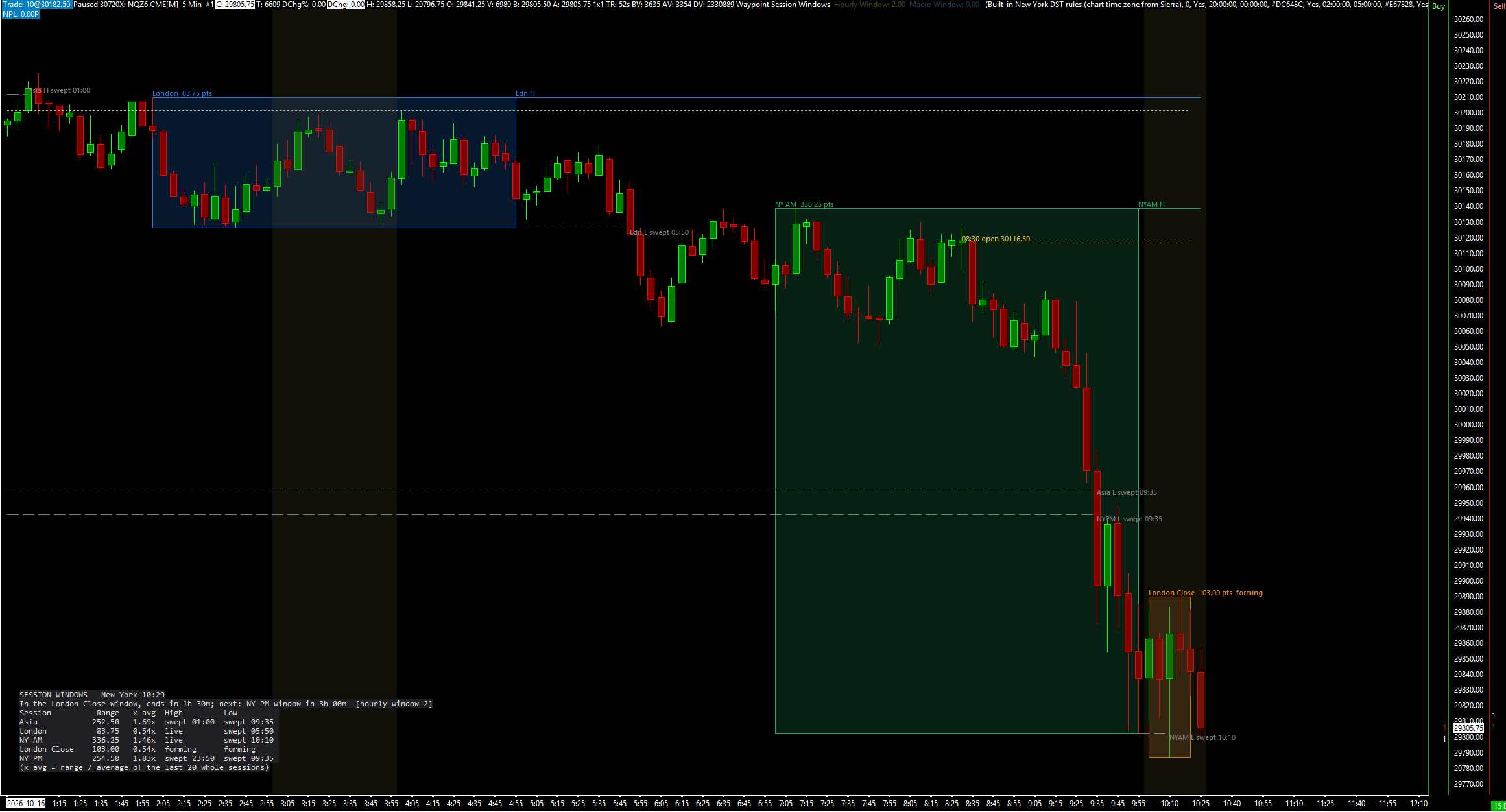
Session Windows draws session high/low boxes for Asia, London and New York (NY AM, London Close and NY PM) on New York time, whatever your chart's time zone. When a session ends, its high and low extend right until a later bar trades through them, then are marked swept with the time. It also shades three hourly windows and optional macro windows, and draws the midnight, 08:30 and weekly opens. It never repaints, and it draws and alerts only; it places, changes and cancels no orders.
What the study does
- Five session windows on New York time: Asia 20:00-00:00, London 02:00-05:00, NY AM 07:00-10:00, London Close 10:00-12:00 and NY PM 13:30-16:00. Each has its own times, colour and on/off switch.
- Each window is a translucent box over the session's high and low, labelled with its range in points. The box grows on closed bars while the window is open and is fixed once it ends.
- Finished session highs and lows extend right as lines until a later closed bar trades strictly through them. The line then stops, turns the swept colour and is labelled with the side and New York time, such as "Ldn H swept 09:42". An equal print is a touch, not a sweep.
- By default an unswept level stops, marked expired, at the first bar of the next session with the same name.
- Hourly windows (default 03:00-04:00, 10:00-11:00 and 14:00-15:00) as background bands, plus optional macro windows 10 minutes either side of 09:00, 10:00, 11:00, 12:00 and 15:00.
- Open lines: the midnight and 08:30 opens run to 17:00 New York; the weekly open (Sunday 18:00) runs to the next one.
- A panel with the New York clock, the window you are in and its time left, the time to the next window (skipping the weekend close), and each window's latest range against its average over the last 20 whole sessions, with its high and low marked forming, live, swept or expired.
- No repainting: boxes, lines and sweeps use closed bars only. Draw the Forming Bar (default off) adds the forming bar to the box as a provisional state.
- Alert sounds when a window starts and when a session high or low is swept, plus hidden subgraphs for the window ids, sweep flags, each window's high and low, and the opens.
What you need
- A 24-hour (Globex) chart. On an RTH-only chart the Asia and London windows are empty and the midnight and 08:30 opens never qualify.
- A bar size that divides the windows, such as 1-, 5-, 15- or 30-minute bars. A 60-minute bar starting at 13:00 is not in a 13:30 window.
- The chart's time zone set correctly in Sierra Chart. The study converts the chart's bar times to New York time itself.
- A back-adjusted continuous contract if you look at long history, so a roll is not read as a sweep.
Set it up in Sierra Chart
Step 1: Buy and download
Buy this study on its own here, or all eight Waypoint Smart Money studies at once from the Smart Money page (one .zip with every DLL). Checkout is a one-time payment. As soon as it is confirmed, the page Stripe returns you to has a Download button, and the receipt email carries the same link. Extract the .zip to any folder. It holds WaypointSessionWindows_64.dll, plus a short INSTALL.txt.
Step 2: Unblock the DLL
Right-click WaypointSessionWindows_64.dll > Properties. If the General tab shows an "Unblock" box, tick it, then click OK. Windows' Smart App Control can still refuse an unsigned DLL. If it does, the study is missing from the Add Custom Study list, or Sierra Chart's Message Log shows a loading error with the code 4551. Turning Smart App Control off is your own decision.
Step 3: Copy it into Sierra Chart's Data folder
Copy WaypointSessionWindows_64.dll into Sierra Chart's Data folder. On a default install that is C:\SierraChart\Data. Otherwise it is the Data folder inside wherever Sierra Chart is installed.
Step 4: Add the study to a chart
Open the chart, then Analysis >> Studies >> Add Custom Study. Find the group "Waypoint Session Windows", select "Waypoint Session Windows", click Add, then OK. If the group is not in the list, restart Sierra Chart and look again.
Step 5: Check New York time
Every window and open time is New York time, on a chart in any time zone. Open the study's Settings. New York Time From picks how bar times are converted: Built-in New York DST rules (chart time zone from Sierra), the default, Sierra time-zone conversion (chart zone to New York), or Fixed offset below (no DST). The fixed offset uses Chart Time Zone Offset From New York (hours, fixed-offset mode) and is exact only when your chart's zone changes clocks on the same dates as New York, such as Chicago at -1.
Step 6: Choose your windows
Each window has Show, Start (New York), End (New York, exclusive) and Color inputs. A start later than the end wraps past midnight. For the hourly windows, set a Start equal to its End to turn that one off. Show Macro Windows (default No) turns the macro bands on; Macro Hours sets which hours they surround.
Step 7: Choose how levels end
Extend Finished Session Highs/Lows Until Swept (default Yes) draws the lines. With Stop a Level at the Next Session of the Same Name on (default), an unswept level ends as expired when that window opens again. Sessions to Draw per Window (default 3) sets how many past sessions of each window are drawn.
Step 8: Read the panel
The panel sits at the middle left by default (Panel Position). It shows the New York clock, the window you are in and the time left, the time to the next window, and for each window its latest range, that range as a multiple of its average (Panel: Average Over Sessions, default 20), and whether its high and low are forming, live, swept or expired.
Step 9: Check that it loaded
Open Window >> Message Log. Look for a line that starts with "Waypoint Session Windows BUILD", followed by the build date and time. That line proves the study loaded. The line also names the New York time conversion in use and the chart's time zone. Unless you use the fixed offset, a second line, "Waypoint Session Windows time check", says on how many quarter-hours Sierra's conversion and the built-in rules agree. If it is logged as an error, switch New York Time From and tell us.
Settings to check first
Open them with a right-click on the chart, then Studies, select the study and press Settings.
- New York Time From
- How bar times become New York time. Default Built-in New York DST rules (chart time zone from Sierra); or Sierra's conversion, or a fixed offset.
- NY AM: Start (New York)
- Default 07:00, with NY AM: End (New York, exclusive) at 10:00. Every window has its own Show, Start, End and Color inputs.
- Extend Finished Session Highs/Lows Until Swept
- Draws each finished session's high and low as lines until a closed bar trades through them. Default Yes.
- Stop a Level at the Next Session of the Same Name
- Ends an unswept level, as expired, when the same window opens again. Default Yes.
- Sessions to Draw per Window
- How many sessions of each window are drawn. Default 3.
- Hourly Window 1: Start (New York; Start = End turns it off)
- Default 03:00, ending at 04:00. Hourly windows 2 and 3 default to 10:00-11:00 and 14:00-15:00.
- Show Macro Windows
- Bands around the hours in Macro Hours (default 9,10,11,12,15), 10 minutes before and after each. Default No.
- Alert Sound When a Session High/Low Is Swept (0 = off)
- Plays on the close of the bar that sweeps a level. Default 0 (off). A window-start alert sound has its own input.
Good to know
- It draws and alerts only. It places, changes and cancels no orders, and the windows and levels are not trade signals.
- Waypoint's own tests found that sweeps of the Asia and London highs and lows inside the NY AM window did no better than sweeps outside it, and the hourly windows added nothing. The windows mark times of day, not an edge.
- A bar belongs to a window by its start time, so 60-minute bars miss a 13:30 window. Use a bar size that divides the windows.
- On an RTH-only chart the Asia and London windows are empty and the midnight and 08:30 opens never appear.
- On a continuous chart that is not back-adjusted, a level from the old contract is compared with the new contract's prices after a roll, so a sweep there means nothing.
- Drawings are capped at 990 objects. With Stop a Level at the Next Session of the Same Name off and Also Draw Older Unswept Levels on, a long chart can reach the cap.
How it was tested. The engine was compiled exactly as shipped and compared bar by bar and session by session with an independent reference on years of NQ, ES and CL 1- and 5-minute data and on synthetic edge-case tapes; the forming-bar copy was checked on every bar. Its New York time conversion was checked against Windows' own time-zone database in all 26 Sierra Chart time zones, and the same bars restamped as UTC, London and Chicago time gave identical results.
More Waypoint Smart Money studies
$9.99
Market Structure
Swing and internal structure: HH/HL/LH/LL points, BOS, CHoCH and MSS lines, and strong/weak highs and lows.
$9.99
Fair Value Gaps
Fair value gaps with fill tracking, CE lines, inversions and BPRs, plus a scorecard against random levels.
$9.99
Order Blocks
Order blocks and breaker blocks from structure breaks, on any timeframe, scored against random levels.
$9.99
One-time, instant download
Trade an idea around these levels?
Screen it first. Describe the rule in plain English and it is tested on tick data through pre-registered gates, after costs, with every trial counted in the public ledger.