Waypoint Smart Money · Sierra Chart study
SMT Divergence
SMT divergence between two related markets, such as NQ vs ES, from swing pivots on closed bars.
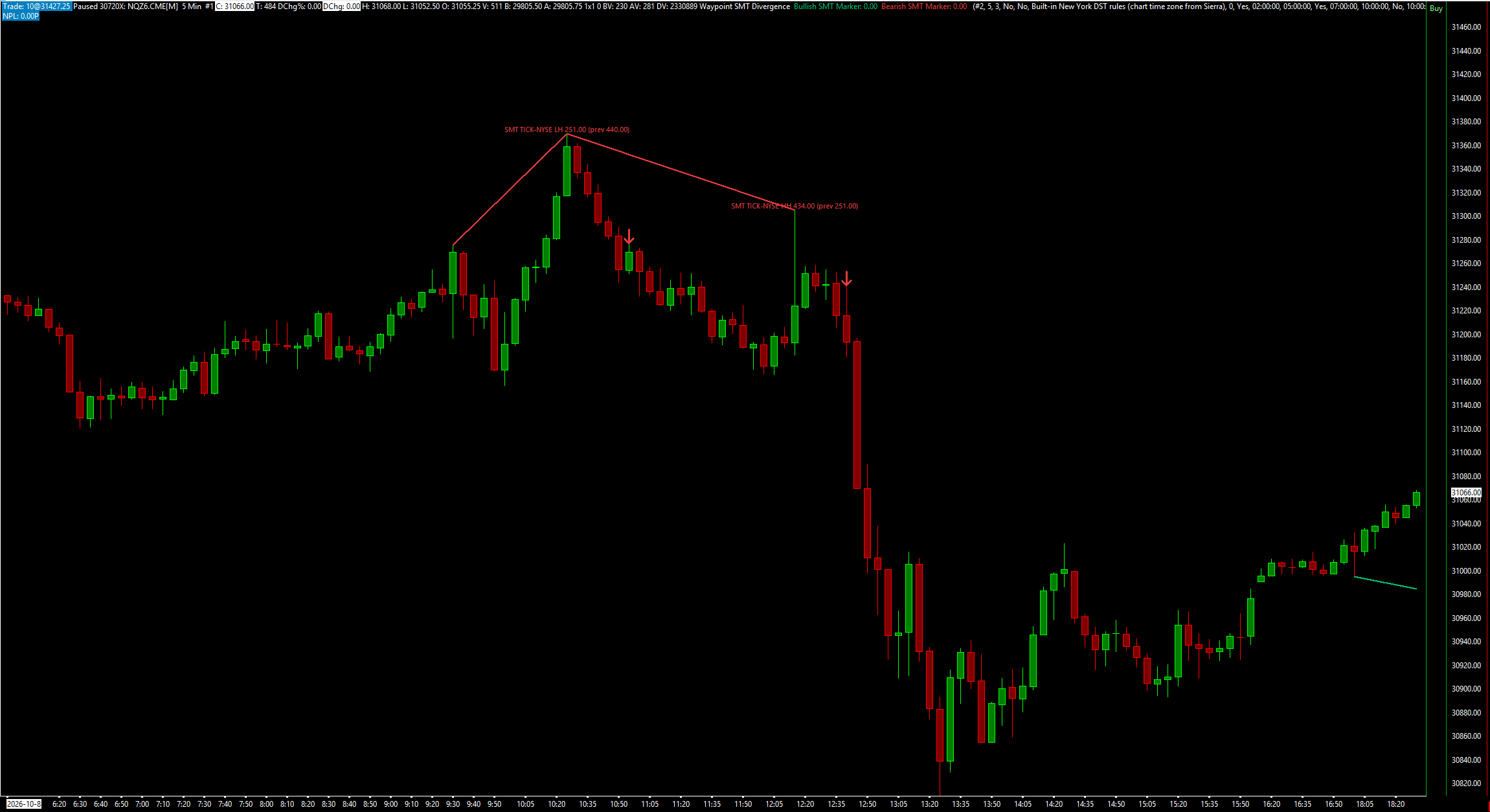
SMT Divergence draws SMT divergences between two related futures markets, such as NQ and ES: one makes a higher high or a lower low and the other does not. It finds each market's swing pivots on bars matched by start time across two charts, and marks the swings where they disagree with a line, a label and an arrow. Everything is decided on closed bars of both charts, so nothing it has drawn changes later. It draws and alerts; it places, changes and cancels no orders.
What the study does
- Bearish SMT: of two swing highs that formed together on the two charts, one market made a higher high than its previous swing high and the other did not. Bullish SMT: the same on swing lows.
- Swings on the two charts are paired when they are at most Max Skew Bars apart (default 3), counted on bars that exist on both charts.
- A divergence line on this chart from its previous swing to the new one, an SMT label at the new swing, and an arrow on the bar that confirms it.
- The label can also show the other market's swing, for example SMT ES LH 5012.25 (prev 5015.00).
- Invert Comparison, for markets that move opposite each other such as ZN against ES or a currency against the dollar index: the other chart's lows act as its highs.
- An optional filter keeps only SMTs whose swing starts inside session windows you switch on, in New York time. London 02:00-05:00, New York AM 07:00-10:00 and New York PM 13:30-16:00 are on by default; London Close and Asia are off.
- No repainting: everything is decided on closed bars of both charts, and a bar waits until the other chart has closed the same bar.
- An optional alert sound once per new SMT, on the bar that confirms it, and an optional dotted ray at the latest bullish and bearish SMT swing levels.
- Hidden subgraphs for alerts, spreadsheets and other studies: the SMT flag, separate bullish and bearish flags, and the latest SMT swing prices on both charts.
What you need
- A second chart of a related market, such as ES beside NQ. A market that moves the other way, such as ZN against ES, works with Invert Comparison.
- Both charts on the same bar period, session times and time zone. Bars are matched by their start time, and a bar on only one chart is skipped.
- There is no higher-timeframe input. Put both charts on the timeframe you want.
Set it up in Sierra Chart
Step 1: Buy and download
Buy this study on its own here, or all eight Waypoint Smart Money studies at once from the Smart Money page (one .zip with every DLL). Checkout is a one-time payment. As soon as it is confirmed, the page Stripe returns you to has a Download button, and the receipt email carries the same link. Extract the .zip to any folder. It holds WaypointSMTDivergence_64.dll, plus a short INSTALL.txt.
Step 2: Unblock the DLL
Right-click WaypointSMTDivergence_64.dll > Properties. If the General tab shows an "Unblock" box, tick it, then click OK. Windows' Smart App Control can still refuse an unsigned DLL. If it does, the study is missing from the Add Custom Study list, or Sierra Chart's Message Log shows a loading error with the code 4551. Turning Smart App Control off is your own decision.
Step 3: Copy it into Sierra Chart's Data folder
Copy WaypointSMTDivergence_64.dll into Sierra Chart's Data folder. On a default install that is C:\SierraChart\Data. Otherwise it is the Data folder inside wherever Sierra Chart is installed.
Step 4: Add the study to a chart
Open the chart, then Analysis >> Studies >> Add Custom Study. Find the group "Waypoint SMT Divergence", select "Waypoint SMT Divergence", click Add, then OK. If the group is not in the list, restart Sierra Chart and look again.
Step 5: Open the comparison chart
Open a chart of the related market beside the one the study is on, for example ES next to NQ. Give it the same bar period, session times and time zone, for example both 5-minute. Note its chart number: Sierra Chart shows it after the # in the chart's title bar.
Step 6: Point the study at it
On the NQ chart, open the study's Settings and set Comparison Chart Number to the ES chart's number (default 2). For a pair that moves opposite each other, such as ZN against ES, set Invert Comparison to Yes.
Step 7: Optional: keep only SMTs inside session windows
Set Only SMTs Whose Swing Is Inside an Enabled Session Window to Yes to keep SMTs whose swing on this chart starts inside a window you switched on. Each of the five windows has a Use, Start and End input, in New York time whatever your chart's time zone; an end time is not part of its window, and a window may cross midnight.
Step 8: Check that it loaded
Open Window >> Message Log. Look for a line that starts with "Waypoint SMT Divergence BUILD", followed by the build date and time. That line proves the study loaded. The same line names the comparison chart and counts the bars matched and skipped. If fewer than 90% of bars matched, a second line says so: check that both charts have the same bar period, session times and time zone. While any session window is switched on (three are by default), a "Waypoint SMT Divergence time check" line follows. If it is logged as an error, the study's New York time and Sierra Chart's disagree for your chart's time zone.
Settings to check first
Open them with a right-click on the chart, then Studies, select the study and press Settings.
- Comparison Chart Number (same bar period and session times)
- The chart of the other market, such as ES when this chart is NQ. Default 2.
- Swing Length (bars each side; 5 = SMT default, 3 = internal)
- Bars each side of a swing pivot, 1 to 50. Default 5. An SMT is known that many bars after the later of its two swings.
- Max Skew Bars Between the Two Swings
- How many matched bars apart the two charts' swings may be and still pair, 0 to 20. Default 3.
- Invert Comparison (inversely correlated pair, e.g. EUR vs DXY)
- Reads the other chart upside down, so its lows act as its highs. Default No.
- Only SMTs Whose Swing Is Inside an Enabled Session Window
- Keeps only SMTs whose swing on this chart starts inside a switched-on window. Default No.
- Session Window Times: New York Time From
- How chart time becomes New York time for the windows: Built-in New York DST rules (default), Sierra's time-zone conversion, or a fixed offset.
- Window 2: Use New York AM
- Switches the New York AM window on. Default Yes, 07:00 to 10:00 New York. Each of the five windows has its own Use, Start and End inputs.
- Alert Sound Number on a New SMT (0 = off)
- The alert sound for a new SMT, played once on the bar that confirms it. Default 0 (off).
Good to know
- A charting and context tool, not a signal. Waypoint's own check of NQ against ES found that a swing with an SMT was no better a place to trade than a swing without one.
- Both charts need the same bar period, session times and time zone. Bars on only one chart are skipped, so its swings can differ slightly from a single-chart study's swings on the same chart.
- An SMT appears Swing Length bars after the later of its two swings, when both are confirmed. Live, a closed bar waits until the comparison chart has closed the same bar.
- If only the comparison chart updates, this chart catches up on its own next update.
- Bars inserted in the middle of the comparison chart, for example by a data download, are not detected. Reload the chart.
- It draws and alerts only. It places, changes and cancels no orders.
How it was tested. The engine was compiled exactly as shipped and compared swing by swing and SMT by SMT with an independent reference on years of NQ, ES, CL and ZN 1-, 5- and 15-minute data, including inverted pairs and runs with bars deliberately removed from one or both charts. The forming-bar path was checked against the closed-bar result, and planted bugs were all caught.
More Waypoint Smart Money studies
$9.99
Market Structure
Swing and internal structure: HH/HL/LH/LL points, BOS, CHoCH and MSS lines, and strong/weak highs and lows.
$9.99
Fair Value Gaps
Fair value gaps with fill tracking, CE lines, inversions and BPRs, plus a scorecard against random levels.
$9.99
Order Blocks
Order blocks and breaker blocks from structure breaks, on any timeframe, scored against random levels.
$9.99
One-time, instant download
Trade an idea around these levels?
Screen it first. Describe the rule in plain English and it is tested on tick data through pre-registered gates, after costs, with every trial counted in the public ledger.